
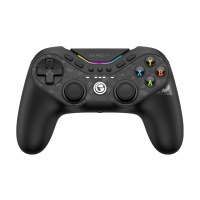
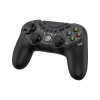
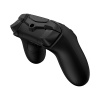
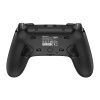
- Code:
- HRG7129
- EAN (bar code):
- 6936685222076
- Number of pcs in box:
- 20
- Weight:
- 0.52 kg
- Volume:
- 2.53 l
- Producer:
- GameSir
Technical Specifications:
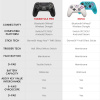
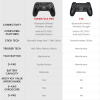
- Compatibility: PC, Switch, iOS, Android and Steam
- Connectivity: Wired, Bluetooth, 2.4GHz wireless dongle
- Battery: 1200mAh
- Wands: GameSir Mag-ResTM TMR sticks
- Triggers: Hall effect with microswitch capability
- 6-axis gyroscope: Yes
- Motors: HD Rumble for realistic feedback
- ABXY Buttons: Membrane
- Back buttons: Yes, 2 programmable buttons
- Mappable buttons: 9 buttons in total
- RGB lighting: Yes, customizable
- NFC function: yes, for Nintendo devices
- Customization Software: Yes, GameSir Connect app
- Firmware update option: Yes
Package includes:
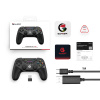
- GameSir Tarantula Pro Controller x1
- 1m Type-C cable x1
- Manual x1
- Thank you card with after-sales service information x1
- GameSir sticker x1
- Certificate x1
- Wireless receiver x1
Connection Instructions
Connecting to Windows
Cable connection
- Use the included USB-C cable to connect the controller to your computer.
- Connection is successful when the channel indicator is lit continuously.
Bluetooth connection
- Press and hold the controller buttons for 2 seconds until the indicators for channels 2, 3 and 4 start flashing, then release the buttons.
- Open the list of Bluetooth devices on your computer, find the device named "Wireless Controller" and click connect.
- Connection is successful when the channel indicator is solid.
Connecting via receiver
- Plug the receiver into the USB port of the device; the receiver indicator will flash.
- Press and hold the buttons on the remote for 2 seconds until the indicators for channels 1, 2, 4 and 5 start flashing, then release the buttons and wait for the remote to connect to the receiver.
- Connection is successful when the indicators on both the controller and the receiver are lit continuously.
Connecting to Nintendo Switch
Bluetooth connection
- From the Switch main menu, go to Controllers - Change grip/sequence and wait on this screen.
- Press and hold the controller buttons for 2 seconds until the channel indicators start flashing horizontally, then release the buttons and wait for the connection.
- Connection is successful when the channel indicator lights up continuously.
Connecting to an Android device
Bluetooth connection
- Press and hold the controller buttons for 2 seconds until the channel 1 and 5 indicators start flashing, then release the button.
- Open the Bluetooth device list on your phone, find the device named "GameSir-Tarantula Pro" and click connect.
- Connection is successful when the channel indicator is lit solid.
Connecting to an iOS device
Bluetooth connection
- Press and hold the buttons on the controller for 2 seconds until the indicators for channels 2, 3 and 4 start flashing, then release the buttons.
- Open the Bluetooth device list on your phone, find the device named "DUOLSHOK 4 Wireless Controller" and click connect.
- Connection is successful when the channel indicator is lit solid.
Note: You can change the color of the Home indicator in the phone settings: Settings - General - Game Controller.
* If the connection is not successful, press and hold the controller pairing button for 2 seconds to re-enter pairing mode.
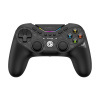
GameSir Tarantula Pro: The revolutionary game controller for demanding gamers
GameSir Tarantula Pro reacts with lightning speed, just like a tarantula hunting its prey. With innovative design and advanced features, this controller is ready to take your gaming experience to a whole new level.
Innovative design and technology
- Extra buttons on the front arranged in three lines
- RGB light strip and coloured front buttons for a distinctive look
- New Mag-ResTM TMR Sticks combining the benefits of a potentiometer and Hall effect
Versatile connectivity and compatibility
- Three connection modes: Bluetooth, 2.4GHz wireless and wired
- Compatibility with Switch, PC, iOS, Android and Steam
- Smooth gaming experience with minimal latency across platforms
Precise controls for professional performance
- GameSir Mag-ResTM TMR sticks for precise performance and low power consumption
- Hall Effect analogue triggers with quick switch to Hair Trigger mode
- HD Rumble for realistic haptic feedback
Advanced Features for Nintendo Switch
- Built-in 6-axis gyroscope for precise motion control
- NFC function to work with Nintendo devices
- One-touch wake-up capability for Switch
Customisation for every player
- 9 mappable buttons for a personalized gaming style
- Adjustable RGB lighting including saturation, animation speed and colors
- Gear wheel mechanism to change the layout of the front buttons between different gaming platforms
- Back button latch for convenient control and prevention of unwanted input
- Ability to remap buttons on the fly using key combinations
These enhancements allow gamers to fully customize the controller to their gaming habits and preferences, ensuring an optimal gaming experience across platforms.
Software Support and Updates
- GameSir Connect app for firmware updates
- Dead zone editing for levers and triggers
- Adjust vibration intensity and test buttons
- Access some functions using key combinations on the fly
GameSir Tarantula Pro is more than just a controller - it's a comprehensive gaming tool designed for maximum performance, comfort and customizability. Whether you're a casual gamer or a seasoned pro, this controller gives you the precision, responsiveness and style you need to achieve gaming excellence. Get ready for a new era of gaming with the GameSir Tarantula Pro!
tarantula cz.pdf
(202 kB)



Add reaction