This site uses cookies

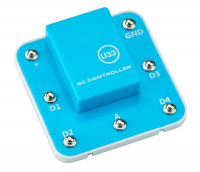
U33

Code:
GB8207
EAN (bar code):
Number of pcs in box:
1
Weight:
0.04 kg
Volume:
1.5 l
Producer:
Boffin


U33 - part (control panel) to connect the kit with Boffin
In the application, go to the main menu (CONTROL - PROGRAMMING - MANUALS). Click on CONTROL and the control panel (OP) will appear.

The U33 driver has 5 outputs (D1, D2, D3, D4 and A) and these are controlled using the Boffin app. Outputs D1-D2 and D3-D4 are paired to each control the motor in both directions and can be used to set one of two output voltage levels, called H (higher - 5V) and L (lower - 3V). Output A is low power and cannot control most motors.

You can control the U33 driver via the Boffin app on your bluetooth device in two ways:

  1. Control Panel (real-time remote control)
  2. Boffin app PROGRAMMING (simple graphical control)

U33 controllers:

  • (+) - battery power output
  • GND - return power to batteries
  • D1 - motor connection output, connected to D2, higher and lower level
  • D2 - motor connection output, connected to D1, higher and lower level
  • A - connection output for low current use, 4V output level
  • D3 - motor connection output, connected to D4, higher and lower level
  • D4 - motor connection output, connected to D3, higher and lower level

In the files tab of the Boffin IV Coding manual


Product has no comments yet, be the first to comment.


Special request


captcha image

E-mail newsletter

Discounts, special offers, news? Be the first one to know. Enter your e-mail and don't miss them.